
Pricing Blog Live calls About Contact Submit an order
Meta AdsMeta Ads Account AuditMeta Ads Setup & LaunchMeta Ads Campaign RescueMeta Ads ManagementCreativeFacebook & Instagram Ad CreativeGoogle AdsGoogle Ads Setup & LaunchGoogle Ads ManagementTrackingMeta Pixel & Conversion TrackingSocial ContentSocial Media Content CreationWeb DesignStarter WebsiteWebsite + SEOWebsite Care & GrowthLanding PageCustom WebsiteLead GenerationCold CallingSMS OutreachDirect MailDriving for DollarsEmail OutreachReal Estate OperationsWholesaling OperationsProperty Management Support
Home / Blog / Guide
Guide

What Is X Calls? A Plain-English Guide for Small Business Owners (2026)

X Calls lets anyone join a call from a link, with no X account. What it is, how it differs from calls in X messages and X Numbers, what it costs, and how a small business can use it.

In October 2026, X started testing X Calls: a calling and meeting service at call.x.com that anyone can join from a web browser with a link or a short code. The person hosting needs an X account. The people joining don't. For a small business, that makes it a free way to let customers talk to you from your website, a post or an email, without asking them to install anything.

X now has three ways to call. Here's how they differ.

The name causes confusion, because X added calling features in three separate places. Only one of them works for people who don't use X.

X Calls (call.x.com)Calls in X Chat (messages)X Number
What it isCall links anyone can open in a browserAudio and video calls between X accountsA private code that lets people message or call you on X Chat
Caller needs an X accountNoYesYes
Who can reach youAnyone with your link, or only the people you let inWho you allow in settings: your address book, people you follow, verified users or everyoneAnyone who enters your current code
StatusBeta since early October 2026Available to all accountsLaunched 22 September 2026
CostNo price announced; free to join in the betaFreeNo subscription listed by X

X's help center adds one rule for calls inside messages that matters for businesses: you can only call someone who has sent you a message at least once before. X Calls has no such rule. The link is the invitation.

How joining works for your customers

This is what a customer sees on a phone, signed out of X, when they open a call link:
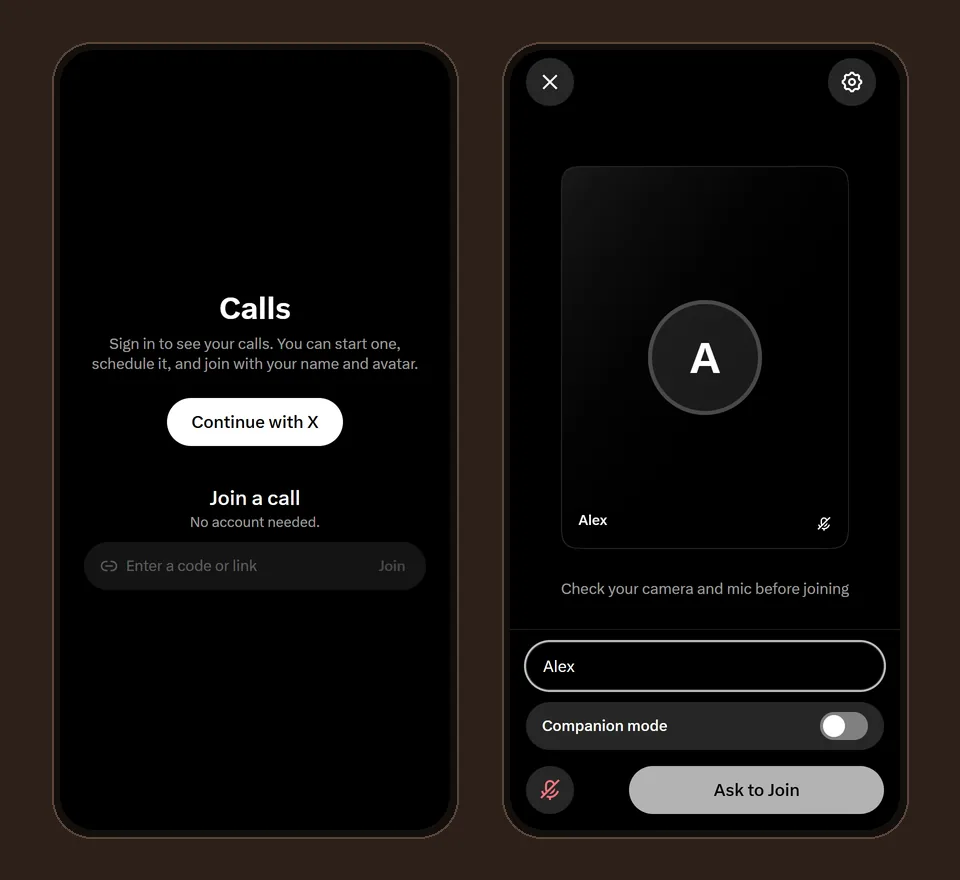
Two phone screens: the X Calls start page with a Join a call box, and the preview screen with a name box and an Ask to Join button
Left: the start page at call.x.com, where a code can be typed. Right: the preview screen, where the customer types a name and asks to join.
  1. Open the link A link looks like call.x.com/abc-def-ghj. With a code instead, they type it at call.x.com under “Join a call”.
  2. Type a name No sign-in. The name is what the host sees.
  3. Allow the microphone The browser asks. If the call was opened as a voice call, the camera isn't requested at all.
  4. Join, or ask to join Depending on the host's setting, they're in at once or they wait until the host admits them.

What hosts control

Who can join
Everyone with the link; only verified people from your organization; or only people an admin approves, who wait until you let them in.
Admit or decline
Waiting guests appear by name, and you let them in one at a time or all at once.
When calls happen
Start a call now, or schedule one with a title, a time and an optional repeat, such as every weekday.
Invitations
X can email invitations to people with X accounts. Everyone else simply gets the link.

Some of these features are still being switched on account by account during the beta, so you may not see all of them yet.

Limits to know before you rely on it

  • It's a beta. Screens, features and rules can change.
  • It doesn't ring anyone. Someone has to be in the call to let people in, and when you sit in a call alone X asks “Are you still there?” and takes you out within 2 minutes unless you tap Stay.
  • On an iPhone with the X app installed, call links can open in the app instead of the browser, because X registered its app for call.x.com links.
  • X hasn't published a security statement for X Calls, and its help center says group calls in messages aren't end-to-end encrypted yet. Keep passwords and card numbers off every call.
  • For calls inside X messages, X connects the two devices directly by default, which can show each side's IP address. Turning on “Enhanced call privacy” in Chat settings routes the call through X and hides it.

Ways a small business can use it

  • A “call us live” button on your website during set hours, so visitors can ask a question in the moment
  • Open office hours for customers, for example one afternoon a week
  • Quick consultations or quotes without giving out a phone number
  • Walking a customer through an order or a form, with screen sharing
A small business owner in her studio, smiling on a phone call next to her laptop

What it won't replace is a phone line that rings. X Calls works best when you choose the hours and keep the call open during them.

How we use it at Faevorite

We keep a voice line open on X Calls on weekdays, so anyone reading our site can ask about a service before ordering. It's optional, it isn't a sales call, and every price stays on the pricing page. Here's when we're open, in your time:

OpenClosed Our hours · X Calls

Weekdays, 7 AM to 4 PM US Eastern for most of the year

US Eastern time

  1. Mon7 AM – 4 PM ET
  2. Tue7 AM – 4 PM ET
  3. Wed7 AM – 4 PM ET
  4. Thu7 AM – 4 PM ET
  5. Fri7 AM – 4 PM ET
  6. SatClosed
  7. SunClosed

More detail on what to ask and how a call works: Talk to Faevorite live.

FAQ

Questions, answered.

Do my customers need an X account to join an X call?

No. They open the link or type the code at call.x.com, enter a name and join from a browser. Only the host needs an X account.

Is X Calls free?

X hasn't announced pricing. During the beta, joining a call costs nothing.

Can customers join from a phone?

Yes, in the phone's browser. On an iPhone with the X app installed, the link may open in the app instead, and they can join there.

Is X Calls the same as X Spaces?

No. Spaces are X's live audio rooms on the X app; X Calls is a separate calling service you join with a link or a code.

Can X Calls replace a business phone number?

Not entirely. It doesn't ring, and someone has to be in the call to let people in. It works best for set hours, like office hours.

Keep reading

More from the blog.

Live calls

Talk to Faevorite Live: Free Voice Calls on X, No Account Needed

When we're open, what to ask, and how to join a voice call from your browser.

Read the post →

Services

Every Faevorite service, scope and price

Meta and Google Ads, creative, websites and lead generation, priced up front.

Browse services →
Get started

Prefer to read and order?

Every service has a fixed scope and a price on the site. Add what you need and submit an order, no call required.

Live call
Telegram